RTX 3090 vs RTX 4090 for Local AI: Which Should You Buy in 2026?
Both have 24 GB of VRAM, so they run the same models. The real question is whether the 4090's speed is worth more than double the price. Here's the honest answer.
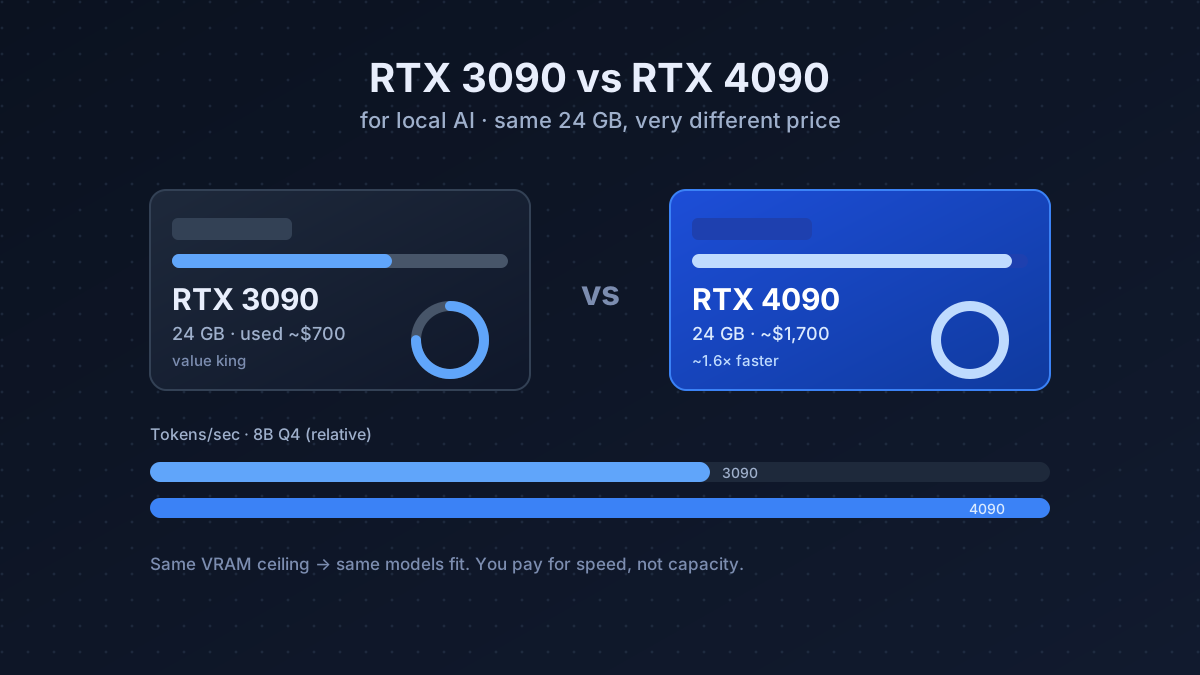
The single most important spec for local AI is VRAM: it decides which models even fit. Here’s the thing most buyer guides bury: the RTX 3090 and RTX 4090 have the same 24 GB. So they load the same models, at the same quantization, with the same context. You are not paying the 4090 premium for capability. You’re paying it for speed.
That one fact changes the whole decision. Below is exactly what the extra money buys, what it doesn’t, and how to pick the card that fits your workload instead of the one the benchmarks-chasers tell you to want.
What you actually get for the extra money
| RTX 3090 | RTX 4090 | |
|---|---|---|
| VRAM | 24 GB | 24 GB |
| Typical price | ~$700 (used) | ~$1,700 |
| Memory bandwidth | 936 GB/s | 1008 GB/s |
| Inference speed (8B Q4) | baseline | ~1.6× faster |
| Power draw | 350 W | 450 W |
| Power connector | 2× 8-pin | 12VHPWR (16-pin) |
| Availability | used only | new |
For text generation, both feel instant on small models; you read slower than either card generates. The 4090’s lead only becomes visible on larger models, long context, and batched or concurrent workloads, where its extra compute and bandwidth shorten the wait on every token.
What the speed difference feels like in practice
Numbers are abstract, so here’s the lived experience. On a 7–8B model both cards spit out text faster than you can read it; you will not notice a difference. On a 32B model the 3090 is comfortably usable but you’ll see it “think” for a beat on long replies, while the 4090 stays snappy. On a 70B at tight context (the edge of what 24 GB holds), the 4090’s bandwidth advantage is most noticeable, but you’re pushing both cards hard.
The honest summary: for interactive, one-prompt-at-a-time use, the 3090 rarely feels slow. The 4090 earns its price when you’re running models continuously, serving multiple requests, or doing image/video generation where raw compute dominates.
Beyond inference: the things spec sheets skip
- Power & PSU. The 4090 can spike to 450 W and uses the 12VHPWR connector; seat it fully (early adapters had melting issues from partial insertion). Budget a quality 850 W+ PSU. The 3090’s 350 W and dual 8-pin are more forgiving; a good 750 W does it.
- Heat & noise. Both run hot. In a small case, sustained inference will heat the room. Plan airflow; an undervolt (below) tames both temperature and fan noise.
- Undervolting. Both cards lose almost no inference speed when undervolted, but drop 50–100 W and run noticeably quieter. It’s the first thing to do after buying either.
- Resale. The 3090 has already taken most of its depreciation; the 4090 has further to fall. If you might resell in a year, the used 3090 protects more of your money.
Buy the 3090 if…
- Your main use is running and learning local LLMs.
- You want the best VRAM-per-dollar available today.
- You’re fine with a used card (they’re plentiful from the gaming market).
- You’d rather put the ~$1,000 difference toward a second 3090 later for 48 GB total.
NVIDIA GeForce RTX 3090
- 24 GiB VRAM
- 350 W TDP
- 936 GB/s
- 2020
~$700 street price
The value king for local AI. 24 GB runs 8B–14B models fast and fits a quantized 70B. Buy used from a reputable seller, stress-test it on arrival for 20–30 min, and undervolt it for a cooler, quieter machine.
Buy the 4090 if…
- You also game at 4K or do Stable Diffusion / video generation, where its compute shines.
- You run larger models daily and the speed genuinely pays for itself in saved time.
- You want a new card with a warranty rather than a used one with unknown history.
NVIDIA GeForce RTX 4090
- 24 GiB VRAM
- 450 W TDP
- 1008 GB/s
- 2022
~$1700 street price
Noticeably faster and brand-new, but you pay a steep premium for speed you may not need for text-only LLM work. Worth it if image/video generation or gaming share the box.
A third option: two used 3090s
If your real goal is to run bigger models rather than run the same models faster, the money is better spent on a second used 3090. Two 3090s give you 48 GB of VRAM, enough for a 70B at generous context, for roughly the price of one 4090. You need a motherboard, PSU, and case that can take two cards, but for model size this beats a single 4090 every time. See the VRAM guide for exactly what 48 GB unlocks.
The verdict
If this is a dedicated AI box, the 3090 wins on value every time. The 4090 only makes sense when something else in your workflow (gaming, image, video) also benefits from the raw horsepower, or when you run models so heavily that shaving seconds off every reply adds up. Don’t pay double for tokens you’ll never notice arriving faster. Size your card with the VRAM guide, and if you’re not sure you’ll use it daily, rent one first to find out.
Gear mentioned in this post
- Check RTX 3090 price
NVIDIA GeForce RTX 3090
24 GiB · ~$700
- Check RTX 4090 price
NVIDIA GeForce RTX 4090
24 GiB · ~$1700
Frequently asked questions
Is the RTX 4090 worth it over the 3090 for local AI?
Only if you also game at 4K or do heavy image/video generation. For text-only LLM work both cards run the same models on 24 GB of VRAM, so a used RTX 3090 (~$700) gives almost the same experience for less than half the price.
Can a used RTX 3090 run a 70B model?
Yes, at 4-bit quantization and a modest context window. Its 24 GB of VRAM fits a 4-bit 70B tightly; for longer context or higher quality you'd want 48 GB across two cards.
How much faster is the RTX 4090 than the 3090 for LLMs?
Roughly 1.5–1.7x faster on inference, but it costs 2–2.5x more. On small models both feel instant; the gap only matters on large models, long context, or batched workloads.
Is it safe to buy a used RTX 3090 in 2026?
Generally yes: they are plentiful from the gaming market. Buy from a reputable seller and stress-test the card on arrival with a sustained inference or memory test to catch any VRAM faults.